01
Type or paste plain text
Start from a normal phrase, caption, username idea, or short horror line. The live output stays tied to your source text, so the corrupt text generator changes the look without changing the words.
Use our corrupt text generator to glitch, curse, or completely ruin your text. Type below to test the corruption, tweak the style, and instantly copy the result.
Type below to test the corruption, tweak the style, and instantly copy the result.
Start from a normal phrase, caption, username idea, or short horror line. The live output stays tied to your source text, so the corrupt text generator changes the look without changing the words.
Preset chips change the mark family, while the style control changes how those marks spread above, through, and below the letters. Mild stays readable, while Cursed pushes into heavier zalgo text.
Use the live board to decide whether the result feels glitchy, cursed, or just unreadable. If the current pattern is close but not right, regenerate without rewriting the source words.
Once the text looks right, copy it for bios, usernames, captions, or meme text. Clean mode is there when you need to recover the readable base letters from corrupted Unicode.
A corrupt text generator takes your ordinary letters and layers them with crazy Unicode combining marks. The result looks broken, haunted, and unstable, but it still behaves like regular copyable text! Instead of creating an image, this tool generates real characters that you can paste directly into your username, caption, chat message, or bio.
We give you total control because corrupted text is super easy to overdo! A short word can become completely unreadable if every letter receives too many stacked marks. Our tool keeps your original message visible, letting you decide exactly how far to push the damage. Start with a readable glitch effect, move into heavier marks, or use the clean mode to strip the generated marks back out.
This kind of tool is perfect when you want to add an intense, eerie atmosphere to your words. People love using our corrupt text generator for horror captions, creepy profile names, gaming handles, Halloween posts, or anytime a message needs to feel uniquely damaged. It works beautifully on short text because the visual noise has more room to stand out!
For the best results, try to avoid super long paragraphs—they can become hard to read after corruption. Keep it punchy! If you want your text to look cool anywhere, use Mild or Glitch styles. If you're going for maximum cursed chaos, turn it up to Heavy!
A creepy text generator is most useful when the output still fits the place where you want to paste it. Use Mild or Glitch for bios, usernames, Roblox-style display text, Discord snippets, and Reddit comments where people still need to read the words.
Save Heavy or Cursed for short Halloween titles, ARG clues, haunted warnings, and one-line scary font copy and paste effects. Dense Unicode marks can be clipped, stripped, or read awkwardly by some apps, so preview the result in the target app before using it permanently.
Clean mode is a practical fallback when a generated result gets too intense. It removes many generated combining marks from the text, but it should be treated as best-effort cleanup instead of a perfect undo for every corrupted string copied from the web.
You might hear these terms used interchangeably, but there's a difference! Glitch text usually implies a digital distortion—think broken screens and static. Zalgo text goes wild with stacked marks that climb way above and below your letters. 'Corrupt text' is the master term for all these damaged-looking Unicode styles.
Our corrupt text generator covers the entire spectrum. Mild adds a subtle texture, Glitch gives you broken digital marks, Heavy stacks things up, and Cursed delivers maximum zalgo chaos. Want the classic copy-paste effect instead of broader cursed text? Use the glitch text generator.
If you searched for an error text generator, start with a short warning-style phrase such as Error 404, signal lost, access denied, or system failure. Mild and Glitch keep the words readable while adding a broken digital look, which works better for bios, captions, game clues, and fake terminal lines.
Heavy and Cursed can make an error-looking line feel more dramatic, but they are best for very short text because dense Unicode marks may render differently across apps. This tool creates decorative copy-paste Unicode text only; it does not diagnose code, create real system errors, or guarantee how every platform will display the result.
Tested on the live tool
This capture uses a short phrase so the added combining marks, intensity choice, and readable base letters can be checked at a glance.
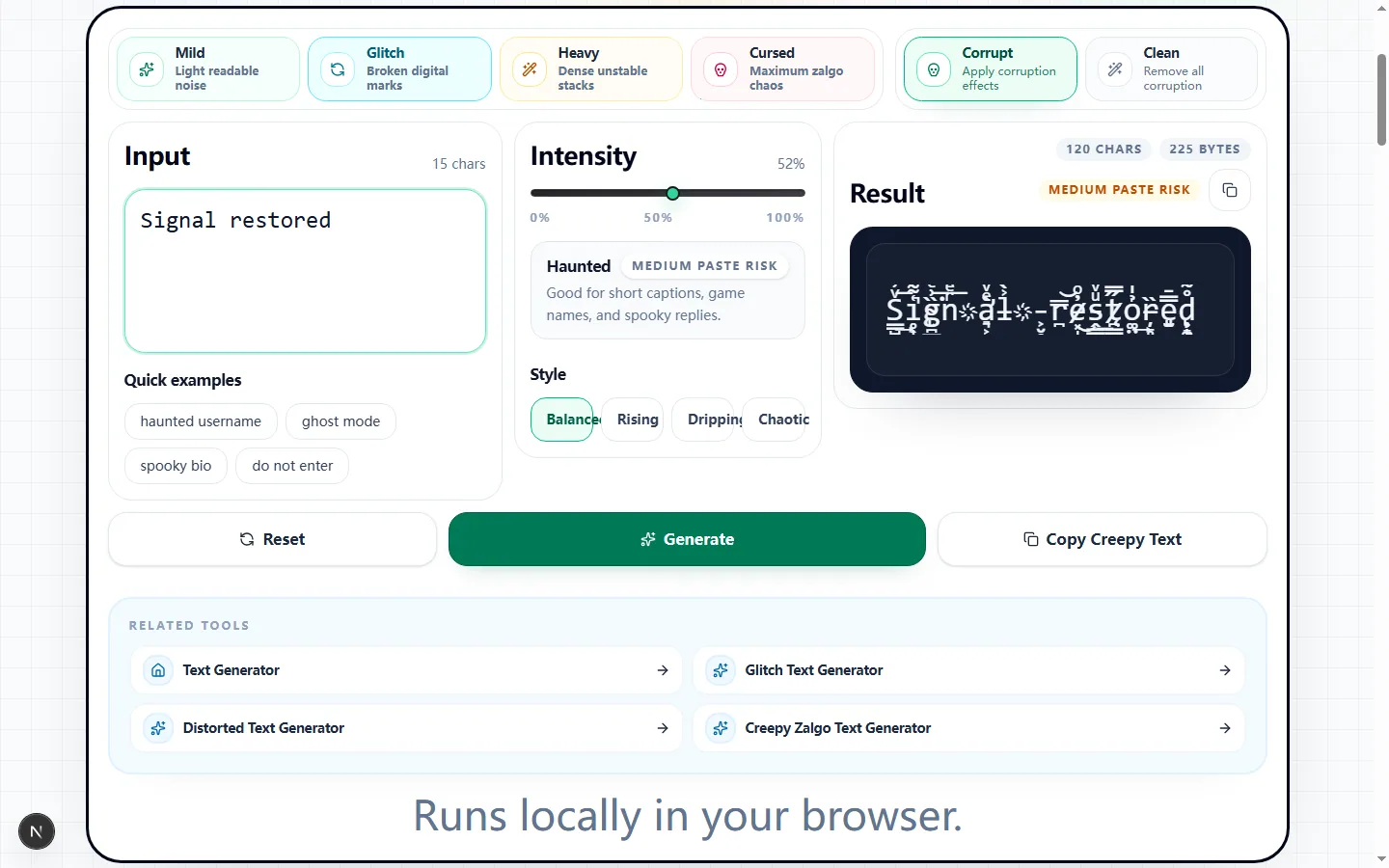
Enter the exact phrase you plan to publish, then begin with Mild or Glitch and the Balanced style. The result updates from your source text, while the panel reports both character count and UTF-8 byte count so you can see how much the added Unicode data has expanded the line.
Move the intensity slider in small steps and compare the live result after each change. When you want another arrangement of marks without retyping the phrase, use Generate; it changes the seeded pattern while keeping the selected preset, intensity, and directional style in place.
Mild uses fewer combining marks, Glitch adds a denser broken-screen texture, Heavy builds taller stacks, and Cursed applies the most aggressive Zalgo-like treatment. These are not downloadable fonts: the generator appends Unicode combining characters to eligible letters and numbers in the source.
Balanced distributes marks above, through, and below the letters. Rising weights the stack upward, Dripping emphasizes marks below the baseline, and Chaotic increases the middle treatment as well; changing style alters the distribution rather than replacing your words with a new message.
Short horror headings, ARG clues, Halloween captions, fictional error messages, and deliberately unsettling usernames make good test cases because the effect can carry the mood without hiding a long argument. A two- to five-word line is usually easier to judge than a paragraph covered in marks.
For a profile name or chat line that still needs to be understood quickly, keep the preset and intensity conservative. Heavy and Cursed are better treated as display effects for brief phrases, not as replacements for body copy, instructions, account details, or other text that people must read accurately.
Clean mode removes the combining-mark ranges produced by this generator and can recover the readable base letters from many corrupt strings. It is useful when you still have a pasted result but no longer want its stacked marks.
Clean mode provides a best-effort recovery. It does not decode arbitrary symbol substitutions, reverse another site's custom alphabet, or reconstruct characters that were deleted before the text reached this page, so compare the cleaned line with the intended wording before publishing it.
Combining marks are valid text, but apps and fonts do not give them identical vertical space. Dense output can be clipped in a username field, wrap unexpectedly in a narrow card, or be stripped by a platform filter; the byte count can also grow much faster than the visible letter count.
Screen readers may announce the marks awkwardly or pause through a heavily decorated line. Keep a plain-text version nearby, avoid corrupting essential labels or links, and prefer Mild output when the same phrase must remain useful to people using assistive technology.
Copy the candidate into the exact destination field, not just a similar app, and inspect it on both a narrow screen and a desktop view. Confirm that no top or bottom marks are cut off, the field accepts the full byte load, and the underlying words remain recognizable at the size where readers will encounter them.
If it fails, return to a lighter preset, reduce intensity, or switch from Rising or Dripping to Balanced. Generate a fresh pattern only after the readability level is right, then save the plain source alongside the final version so you can restore or revise it later.
Short answers to the compatibility and cleanup questions people usually ask before they paste corrupted text into another app.
Intensity
52%
Haunted
Medium paste risk
Good for short captions, game names, and spooky replies.
Style
Result
69 chars
128 bytes
Medium paste risk
Runs locally in your browser.