01
Enter plain text once
Type a username idea, caption draft, bio line, or short message into the input field. The weird text gallery instantly updates from one source text instead of forcing you into one-off outputs.
Browse massive galleries of bizarre, copy-ready styles without opening extra menus.
Type a username idea, caption draft, bio line, or short message into the input field. The weird text gallery instantly updates from one source text instead of forcing you into one-off outputs.
Use the intensity slider when you want more distortion, and keep Favor Readable on when the result still needs to work in casual chat apps.
Each row keeps a stable label so the page feels like a reusable library instead of a random black box. That makes it faster to compare all the funny and cool variations.
Use the per-row copy action when one version is clearly the winner, or copy the full set if you want to paste a few options into another app and decide there.
Don't let the strange looks fool you - most weird text generators are not inventing brand new languages. Instead, they transform your normal keyboard letters into rare Unicode alternatives, mirrored characters, or beautifully spaced designs that remain surprisingly copyable across the web.
We built this tool entirely for speed. When you want something strange for your bio, profile name, or a joke, you do not want to dig through menus. The page acts as a massive live gallery of funky styles that are ready to be copied immediately.
While these styles all overlap, they are not exactly the same. Fancy text usually refers to clean cursive and bold styles, while glitch text involves chaotic, stacking symbols. Use the glitch text generator when that specific copy-paste effect is the goal. A weird text generator acts as a broad umbrella, housing all those playful novelty designs alongside the downright bizarre ones.
Because people love variety, we packed this page with multiple categories. It is easy to browse through row after row of strange text until you find the exact level of weirdness you want to present.
It's everywhere. You will find these styles splashed across social media bios, edgy gaming handles, Discord chats, and creative captions. Whenever plain text just is not exciting enough, these Unicode styles bring the right amount of flair.
Keep in mind, every app and operating system handles strange text a little differently. That is why we display cleaner outputs next to the downright chaotic ones so you can still find a style that works where you plan to paste it.
Tested on the live tool
The short input lets several Unicode rows be compared without truncation, while the readable preference keeps practical choices near the top.
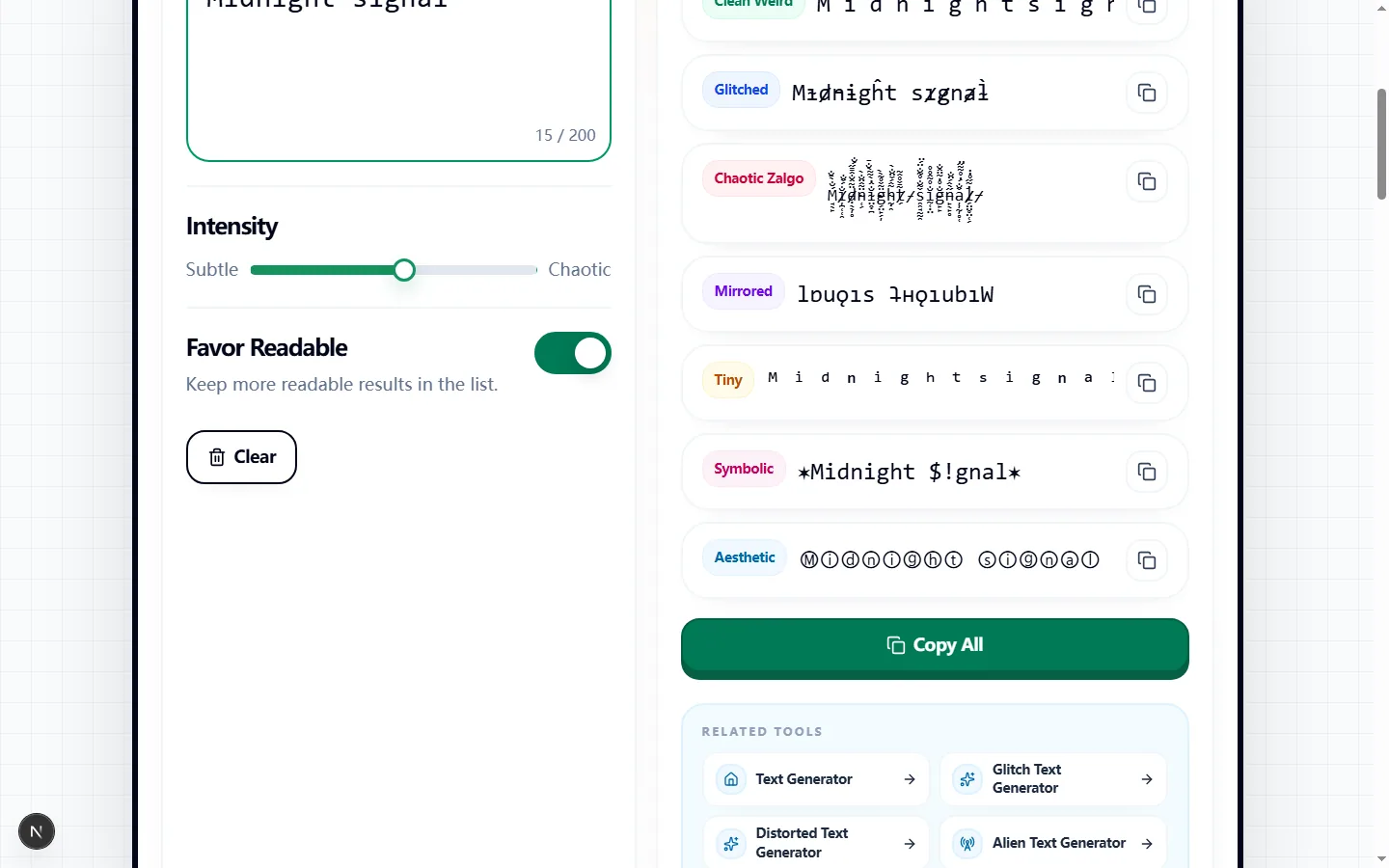
Enter up to 200 characters and the gallery builds seven labeled rows: Clean Weird, Glitched, Chaotic Zalgo, Mirrored, Tiny, Symbolic, and Aesthetic. Keeping every result beside the others makes it possible to compare actual characters rather than guessing from a style name.
The rows update from the same input, intensity, and Favor Readable setting. Copy a single row when you have chosen a style, or use Copy All to place every non-empty output on its own line so you can compare them in another editor.
Glitched and Chaotic Zalgo append combining marks, Mirrored reverses the character order and maps supported characters to mirror-like glyphs, and Tiny maps supported letters and digits to small Unicode forms. Symbolic replaces a subset of supported letters and adds decorative wrappers.
Clean Weird spaces characters, while Aesthetic uses circled forms by default and can switch to fullwidth forms at a high, less-readable setting. Unsupported characters are generally left in place, so a mixed-language input may show a combination of transformed and unchanged glyphs.
Increasing Intensity adds more accents to Glitched, raises the number of Zalgo passes, widens Tiny at higher levels, and increases the chance of Symbolic substitutions. Some structural results, including Mirrored, do not become more reversed when the slider rises.
Favor Readable changes how several rows are generated; it limits denser glitch marks and symbol replacement and keeps the cleaner spacing or circled aesthetic choices. All seven labeled categories remain visible, so use the toggle to compare gentler and riskier variants rather than expecting it to hide whole rows.
Clean Weird and moderate Aesthetic output suit short labels, profile lines, and captions where readers should recognize the source immediately. Tiny can work for compact decorative notes, while Symbolic is better for a short name or motif than for a sentence that carries detailed information.
Glitched and Chaotic Zalgo are display effects for brief horror, gaming, or meme text. Mirrored is useful as a visual puzzle, but it reverses the sequence as well as mapping characters, so it should not be used where the original reading order must stay obvious.
These outputs are text, not font files or images, but that does not guarantee identical rendering. An operating system may lack a mapped glyph, a platform may strip combining marks, and a narrow field may clip tall Zalgo stacks or wrap widely spaced output.
Search, moderation, accessibility, and screen-reader behavior can also differ from plain text because some rows replace ordinary letters with different Unicode code points. Keep the unstyled source for account names or important messages, and do not use novelty output as the only readable version of essential information.
Start with Favor Readable on and an intensity near the middle, then copy the leading candidate into the exact app and field where it will appear. Check for missing-box symbols, clipped marks, unexpected line breaks, and whether another person can still identify the intended words without seeing the source.
If the paste fails, compare the Clean Weird or Aesthetic row before lowering intensity for the more chaotic styles. Use Copy All only for private comparison—before publishing, select one tested row and keep the original plain-text version in your notes for future edits.
Got questions about copying these bizarre letters? Find the fastest answers to help you use this tool anywhere online.
Keep more readable results in the list.
Runs locally in your browser.