Discord ANSI Message Builder

Discord Color Text Generator

Easily customize your server chats.Read more

What is this ANSI color magic inside Discord?

When you use this tool, you're not actually changing your font. Discord uses a specific developer styling trick called ANSI code blocks to add colors to text. We built it to show you exactly which colors Discord supports so you don't waste time trying hex colors that won't work.

Before you drop your text into a chat, the live preview helps you see exactly how it will look. No surprises!

Why we stick to the rules

Discord's desktop and web versions handle these ANSI colors beautifully. However, mobile apps can sometimes be a bit grumpy about them. This tool keeps those limitations in mind so you get honest results.

It’s definitely way more useful than a random color picker because everything here is custom-tailored for Discord’s exact chat box logic.

Tested on the live tool

An editor-to-preview consistency test

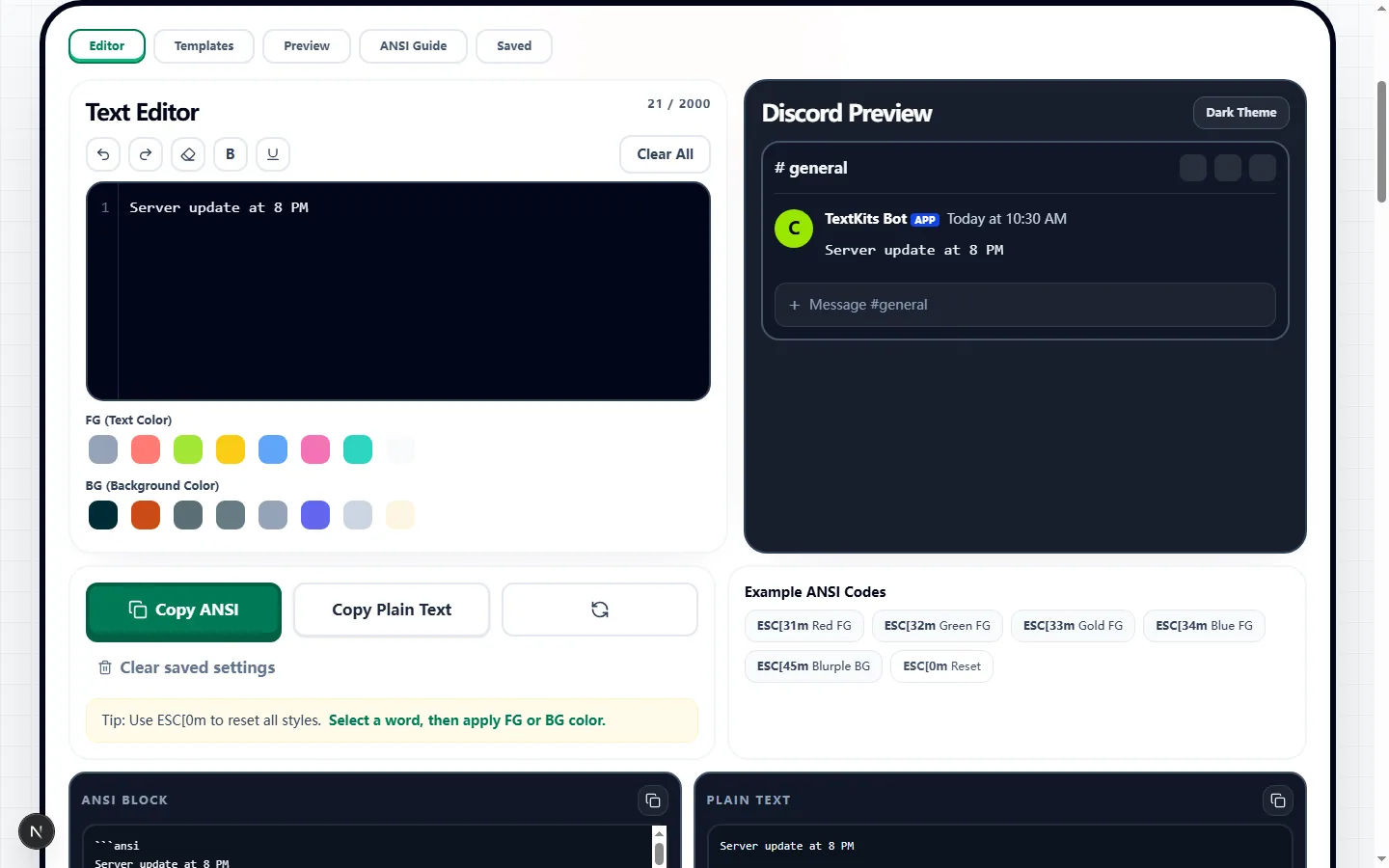
The real editor capture follows one short announcement through the editor, Discord-style preview, plain output, and fenced ANSI block.

Test input
Server update at 8 PM
What was checked
Editor, Discord preview, and ANSI block from one short announcement
Discord Color Text Generator showing one tested server announcement in the editor and Discord-style preview
The same phrase appears in the editor, Discord-style preview, plain output, and fenced ANSI block without changing its wording.Real tool capture; surrounding artwork is decorative.

Build an ANSI message from a real Discord draft

Start in the Text Editor with the exact announcement, rule, or giveaway copy you plan to post. Select a word or phrase before choosing Bold, Underline, a foreground color, or a background color; the controls apply ANSI styling only to the current selection, so the rest of the message stays unchanged.

If you need a starting structure, load the Announcement, Rules, or Giveaway preset and replace its wording. Pasted content is reduced to plain text before it enters the editor, which prevents formatting from another webpage from becoming part of the generated message.

What the generator actually copies

ANSI Block mode wraps the styled result in a fenced code block that begins with `ansi` and inserts escape codes for the selected effects. The available foreground codes are 30 through 37, background codes are 40 through 47, and the editor also supports code 1 for bold and code 4 for underline.

Plain Text mode removes those style instructions and copies only the readable characters and line breaks. Use that fallback when color is not essential or when you need to move the wording into a form, ticket, or app that should not receive an ANSI code block.

Use the preview to catch formatting mistakes

Switch between Dark and Light preview modes to check contrast around every styled phrase. The preview also reports the character count, line count, and active ANSI codes, making it easier to spot an accidental background color, an unreadable combination, or styling that covers more text than intended.

Run a practical check before copying: read the message once without relying on color, confirm every line break, and use Clear Styles if you need to rebuild the formatting cleanly. A warning or role label should still make sense to someone who cannot distinguish the chosen colors.

Where Discord ANSI colors work—and where they may not

The output uses Discord's ANSI code-block behavior rather than custom CSS or hexadecimal colors. The palette is limited to the ANSI foreground and background choices shown in the editor; custom hex and brand colors cannot be encoded in this Discord ANSI block.

Desktop and web clients are the safest places to verify the final post. Mobile rendering can vary, and a copied block may look different in another chat app, a bot dashboard, or a document editor, so send a test message in the actual destination before using it for an important announcement.

Keep reusable snippets on this device

Each successful copy is added to the Saved tab, which keeps up to three recent snippets in this browser's local storage. That is useful for recurring rule labels or event notices, but the saved list does not automatically sync to another browser or device.

The message is assembled in the browser, and copying hands the selected output to your system clipboard. If a draft contains private moderator notes or unreleased information, remove that material before copying, and clear the site's stored data when working on a shared computer.

A reliable final check inside Discord

Paste the generated ANSI block into a private test channel or a message you can delete. Confirm that the opening and closing backticks are present, the first line says `ansi`, the intended phrases carry the right colors, and no raw escape characters are visible.

Then view the same test from desktop or web and, when mobile readers matter, from a phone as well. If the color does not survive or the message becomes harder to scan, switch to Plain Text or use simple labels such as [RULE], [WARN], and [TIP] so meaning never depends on decoration alone.

Discord color text generator FAQ

Got questions about how these chat colors work? Check out the quickest answers before you copy your ANSI text.

Is this real Discord-supported text?

+
Yep! When you hit copy here, you're grabbing the exact ANSI code block structure that Discord requires to display those sweet colors.

Can I use any custom hex color I want?

+
Unfortunately, no. Discord's ANSI system limits the colors you can use. Our generator focuses entirely on those officially supported options so your text actually works.

Will my friends see the colors on their phones?

+
That’s a maybe. Desktop and web users will see it perfectly, but the Discord mobile app sometimes struggles with rendering ANSI colors depending on their phone and the specific style.