Blackout Sensitive Text Fast

Redacted Text Generator

Quickly hide emails, numbers, or custom words using our redacted text generator, then copyRead more

How does redaction actually work in your browser?

Here is the cool part: this isn't just drawing a black box over an image. Our redacted text generator literally replaces your sensitive words with blackout block characters. That means you can copy the whole message—black blocks and all—and paste it safely into an email or chat.

Instead of forcing you to hunt down every single phone number or email by hand, our smart detection does the heavy lifting. You can even type in your own custom words to hide, making this a redacted text generator that actually works for real-life tasks.

Full Blackout vs. Smart Detection

Sometimes you just want to hide everything. That is what our Full Blackout mode is for. It replaces your entire message with thick black bars.

But most of the time, you want people to read *some* of the text! That is why the Smart Detect mode in this redacted text generator is a lifesaver. It automatically finds emails, phone numbers, and URLs, blacks them out, and leaves the rest of your sentence perfectly readable.

Perfect for SCP Foundation & Discord Roleplay

Writing an anomaly draft or a creative story? This acts as the perfect SCP redacted text generator. Instead of manually typing out black boxes, you can quickly convert your [DATA EXPUNGED] logs or containment procedures into copy-and-pasteable text.

Because the blackout blocks are real text characters, they work flawlessly for Discord roleplay servers or your own wikis. Just paste your draft, use our smart detection, and copy the authentic look instantly.

When is the best time to use this?

This tool is amazing for customer support reps sharing ticket examples, developers posting error logs, or anyone trying to share a screenshot or text snippet without leaking personal data.

Because the final text is just a bunch of characters, you always get to review exactly what’s visible before you hit copy and share it with the world.

Tested on the live tool

A redaction coverage check

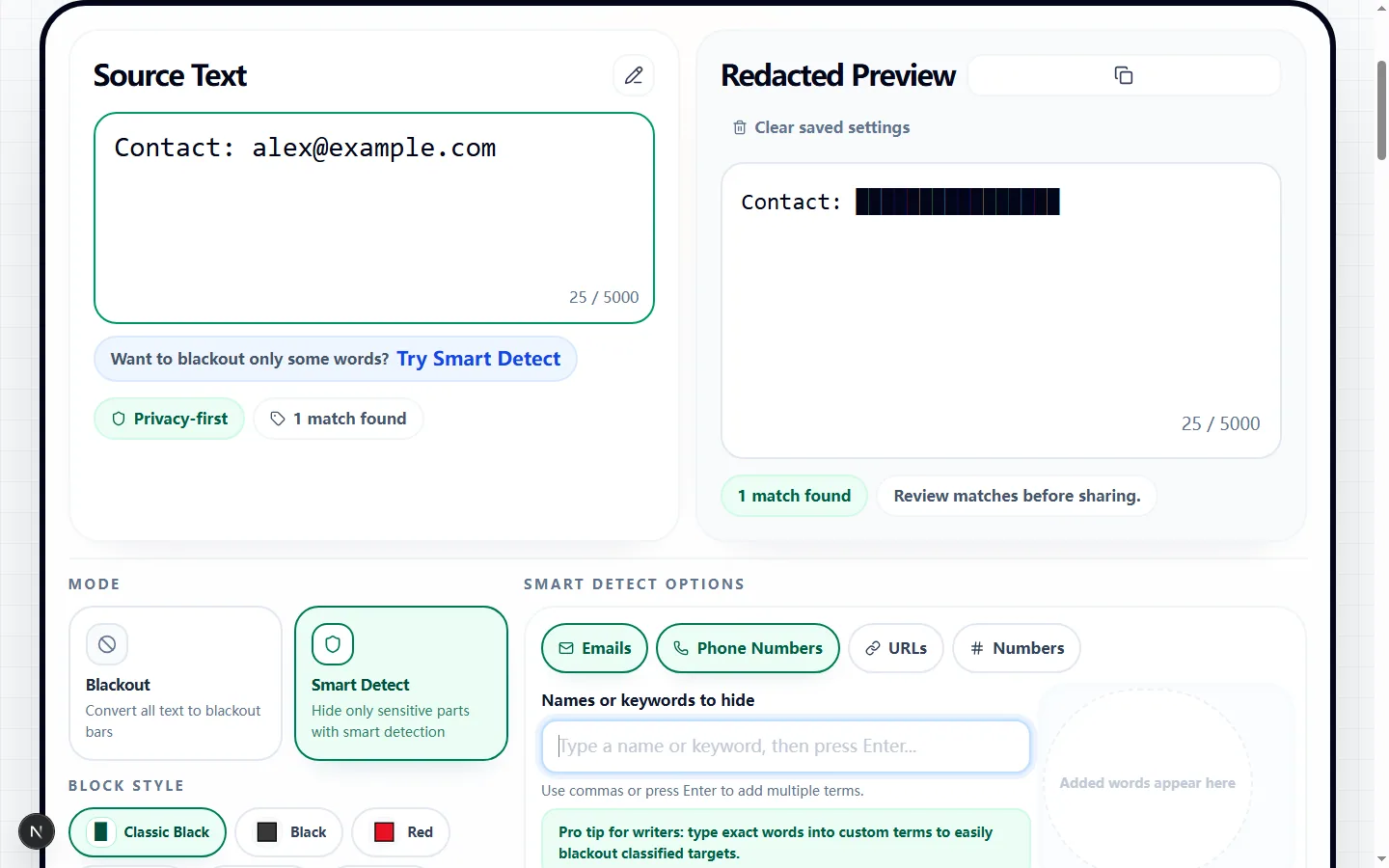
The sample includes an ordinary label and an email address so the hidden part can be checked without losing all of the surrounding context.

Test input
Contact: alex@example.com
What was checked
Smart detection followed by a visual review
Redacted Text Generator showing a tested contact line with the email address obscured
The tested output obscures the sensitive address while keeping the non-sensitive label available to explain what was removed.Real tool capture; surrounding artwork is decorative.

Choose between a complete blackout and selective redaction

Paste up to 5,000 characters into the source box and decide what the recipient still needs to read. Blackout mode replaces letters and numbers across the entire draft while leaving whitespace and punctuation in place, so it is suited to a fully obscured sample rather than a partially readable message.

Smart Detect mode keeps ordinary text visible and masks only the matches produced by the enabled detectors and your custom terms. Use it when the surrounding sentence provides useful context, such as a support-ticket example where the issue description can remain but the customer's contact details cannot.

Configure the detectors for the text in front of you

Email and Phone Number detection are enabled by default in Smart Detect. URL and Number detection are separate switches, which matters because a blanket Number rule can also hide dates, quantities, prices, ticket IDs, or other digits that may be important to the reader.

Add names, project titles, account labels, or other known phrases as custom terms. Case Sensitive and Whole Words Only change how those custom terms are matched, so test both settings when capitalization varies or when a short term also appears inside longer words.

Understand what the blackout characters represent

Classic Black uses the Unicode full-block character, while the other choices use colored square emoji. The selected token replaces each non-space character inside a matched interval, which means the visible block count and width can hint at the original length even though the original characters are no longer in the copied output.

Emoji squares can occupy different widths or switch appearance across fonts and platforms. Choose Classic Black for a compact text-like result, and reserve colored squares for informal posts where appearance matters more than exact alignment.

Review every match instead of trusting automatic detection

The match summary tells you how many merged regions are ready to be masked, and the live Redacted Preview shows the exact copyable result. Read the preview from beginning to end and confirm that every email, phone number, URL, identifier, and custom name you intended to hide has actually become blocks.

Pattern matching cannot understand every local phone format, unusual domain, username, address, or confidential phrase. If sensitive text remains visible, add it as a custom term or switch to Blackout; if useful context disappears, disable the broad detector and use narrower custom terms instead.

Browser privacy and sharing limits

The redaction calculation in this tool runs in the page and the Copy Output action uses your browser clipboard. The page does not need an account, but clipboard contents can still be read by other software or pasted into the wrong destination, so handle the result with the same care as the source draft.

A block character is copyable text, not a legal or compliance guarantee. Do not treat automatic masking as a substitute for your organization's review process, and never rely on visual similarity alone when the source contains passwords, access tokens, financial data, health data, or other high-risk information.

A practical verification routine before you share

First copy the redacted result into a plain-text scratch area and search it for fragments of each sensitive value, including the domain portion of an email and the last four digits of a phone number. Then compare the pasted line breaks and punctuation with the preview to make sure the readable context did not become misleading.

Finally, test the result in its real destination because block and emoji rendering differs among email clients, chat apps, documents, and social platforms. If alignment or readability changes, return to Classic Black or share a carefully reviewed plain-text version rather than assuming the preview is identical everywhere.

Redacted text generator FAQ

Got some privacy concerns? Here are the most common questions people ask before sharing their blacked-out text.

Can I just copy the blacked-out text and paste it somewhere else?

+
Absolutely! That is the whole point of our redacted text generator. The black bars are actually text characters, so they will paste perfectly into Slack, email, or a Google Doc.

Is it possible to hide just one specific word in a sentence?

+
Yes! If our automatic detection misses it, just type that specific word into the custom terms box. We will black it out and leave the rest of your sentence alone.

How do I add my own custom words to redact?

+
It's super easy. Just type your word into the control area, hit Enter (or type a comma), and it instantly turns into a little chip. The page will immediately black out that word anywhere it appears in your text.