Roblox Booth Sign Tool

Please Donate Text Generator

Craft the ultimate Roblox booth sign with this Please Donate text generator.Read more

How to craft a booth sign that actually gets noticed

When you're trying to grab attention in a busy Roblox server, your text needs to be loud and clear. With this Please Donate booth sign tool, you can pick a bold font, splash on some rainbow colors, and check exactly how it'll look on a booth stand before you even open the game.

By previewing your sign right here, you can tweak the styling and shorten your message until it pops perfectly on the screen.

Mastering the font and color controls

Feel free to play around with font sizes, outlines, and those eye-catching rainbow gradients. A good booth sign editor gives you all the tools you need to build a style that matches your exact vibe.

We built our picker with fonts that show up cleanly in your browser. But remember, Roblox has tons of hidden fonts! You can easily copy our HTML and swap in any special Roblox font name you prefer.

Why styling your text is so important

Think about it: players are running past your stand in seconds. Good color contrast and clear fonts mean they can read your sign without stopping. While split colors look amazing, keeping your message short and sweet is always the best strategy.

Our biggest tip? Don't overcrowd the board! If it looks messy in our preview, it's going to look messy in-game.

Quick tips for writing booth text

Be direct about what you're raising Robux for, keep the sentence small, and throw in an emoji or two for flavor. If a player has to squint to read your sign, you've already lost them!

Also, while this tool lets you save drafts locally in your browser, definitely jump into PLS DONATE to do a final visual check to ensure it looks flawless.

Tested on the live tool

A booth-sign readability test

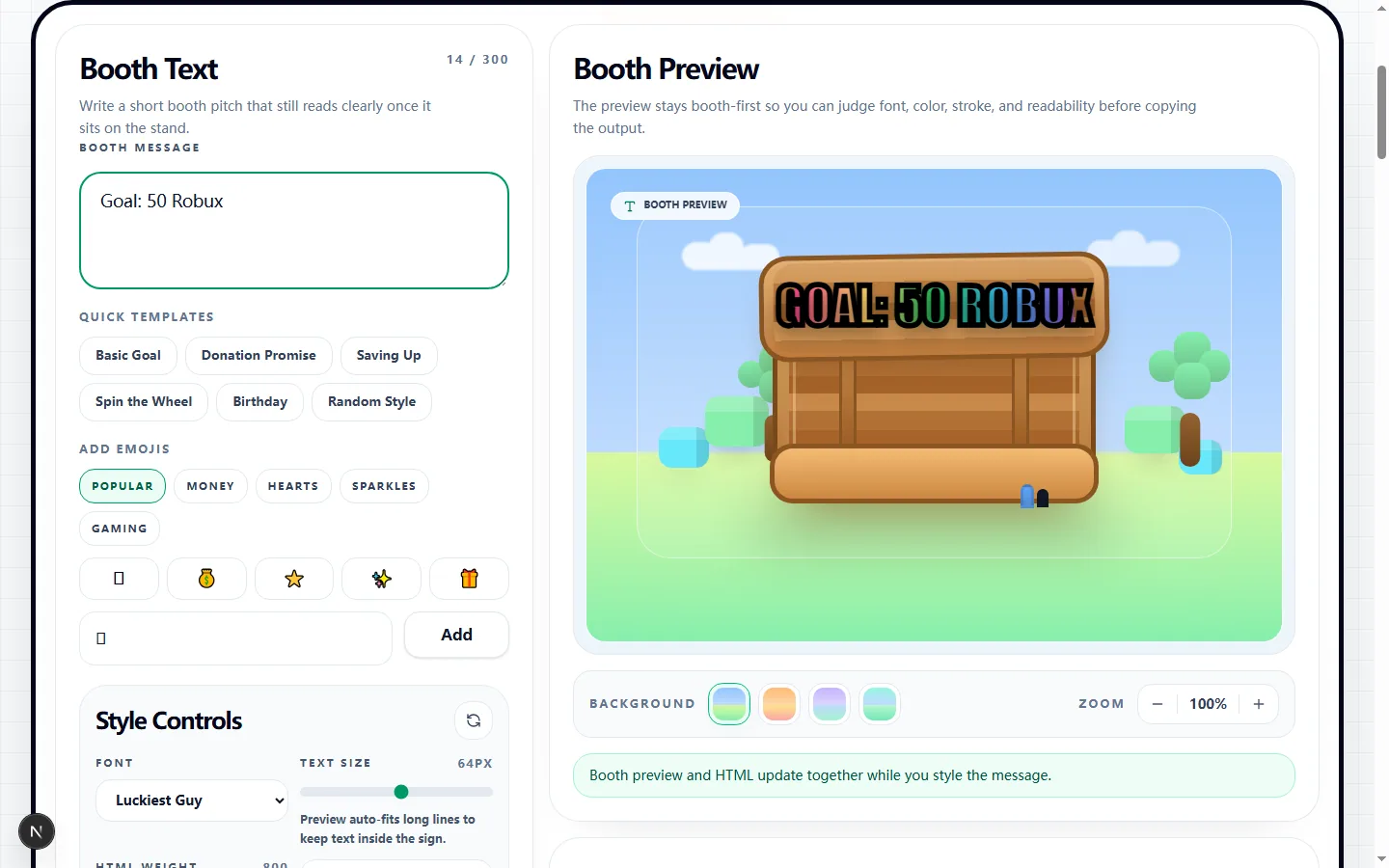
This real preview uses a concrete goal message, making it easier to judge the hierarchy between the request, amount, color, and outline.

Test input
Goal: 50 Robux
What was checked
Short goal message with readable booth styling
Please Donate Text Generator showing a tested Goal 50 Robux booth preview
The compact wording leaves room for the visual treatment without turning the amount or donation goal into background decoration.Real tool capture; surrounding artwork is decorative.

Build the booth message before styling it

Begin with one short promise, goal, or activity that a passing player can understand immediately. You can type your own line or load a built-in starting point such as Basic Goal, Donation Promise, Spin the Wheel, or Birthday, then edit the wording instead of publishing the template unchanged.

The message and booth preview update together while you work. Add an emoji only when it clarifies the idea, and keep the essential request in ordinary words so the sign remains understandable if an emoji or decorative font renders differently in the game.

Tune the controls that appear in the generated HTML

Choose a listed Roblox-style font name, set the text size between 28 and 96 pixels, adjust HTML weight from 400 to 900, and turn italic styling on only when it stays readable. Stroke width can be set from 0 to 12 pixels with its own color, which is useful for separating bright lettering from the booth background.

Solid mode uses the Text Color value. Rainbow and the other gradient modes override that value and build the effect by assigning colors to individual non-space characters, while the selected stroke still applies around the text. The Generated HTML panel shows the exact `<font>` markup and inline style values that the Copy HTML button places on your clipboard.

Judge the sign in the booth preview, not the picker alone

The desktop preview offers Meadow, Sunset, Fair, and Grove backdrops so you can compare the same lettering against different light and dark areas. Use the 85% to 125% zoom control to inspect the sign, but remember that zoom changes your inspection view rather than the HTML font-size value.

Check the smallest letters, the stroke edge, and every line break before copying. Long lines are auto-fitted inside the preview, so a message that technically fits can still be too dense for a player moving past the booth; shortening the copy is usually more reliable than shrinking it further.

Understand the Roblox and PLS DONATE limits

This generator prepares rich-text-style HTML for a PLS DONATE booth; it does not publish the sign or connect to your Roblox account. PLS DONATE supports a limited subset of formatting, and its renderer can interpret font names, outlines, colors, spacing, or emoji differently from a web browser.

The browser preview therefore acts as a planning aid, not a pixel-perfect guarantee of the in-game result. If a font falls back or a gradient becomes noisy after pasting, choose a simpler font, reduce the stroke width, or switch to a high-contrast solid color and test again.

What is saved and what stays private

The Save Message button stores the message text in this browser's local storage so it can be restored on the same device. It does not save a Roblox booth remotely, and it does not promise that the full combination of font, color, stroke, gradient, and backdrop will follow you to another browser.

The HTML is generated in the page and copied through your browser's clipboard permission. Avoid placing account details, private contact information, or anything you would not publish on the booth into the editor, especially when using a shared device where saved text may remain available later.

Test the copied sign in a repeatable way

Copy the HTML, paste it into the booth editor in PLS DONATE, and inspect the live sign from the distance at which players usually approach. Compare the actual font, fill colors, outline thickness, emoji, and wrapping with the browser preview rather than assuming that a successful paste means every style was accepted.

If the result differs, change one control at a time and paste again so you can identify the unsupported piece. Finish by checking the sign on the device you normally play on and by reading it quickly against the game's real background; legibility matters more than reproducing every decorative setting.

Please donate text generator FAQ

Got questions about getting these snazzy fonts into Roblox? Here's everything you need to know about our booth tools!

How do I put this text onto my actual PLS DONATE booth?

+
It's super easy! Just copy the HTML output from this tool, hop into Roblox, and paste it directly into your booth's edit screen.

Why did my sign look slightly different when I opened the game?

+
Roblox's PLS DONATE supports a very specific type of HTML formatting. While our tool tries to match it perfectly, the game's actual rendering engine might interpret some outlines or fonts just a tiny bit differently.

Where are all the other cool Roblox fonts?

+
Our menu highlights the ones that load securely in your web browser. But you can still use this tool to build the code, and then manually type your favorite Roblox font name into the copied HTML!

Will this tool remember my awesome sign design for tomorrow?

+
Yes, if you click the local save button! It keeps your draft safely stored right in your browser so you don't have to start from scratch.

I have no idea what to write on my booth... help?

+
We've got you covered! You can start with our built-in templates and emoji suggestions to quickly get a booth-ready sign without staring at a blank screen.