Tone Twist Tool

Sarcasm Text Generator

Drop in some plain text and let this tool mock it perfectly.Read more

What this sarcasm text generator actually does

Have you ever wanted to perfectly capture that Mocking SpongeBob meme tone without manually holding down the shift key? That's exactly what this tool is built for. Simply paste your text, select a normal or cursed character style, pick a casing pattern, and copy the hilarious result instantly.

Just to clear things up, this isn't an AI tool that rewrites your essay. It specifically transforms your exact words into that instantly recognizable alternating or random uppercase/lowercase sarcastic format.

Alternating versus random casing

With alternating mode, the tool flips every single letter mathematically between upper and lower case. But with random mode, the casing is wildly unpredictable, making your text look wonderfully chaotic and unhinged!

We even give you start-lowercase or start-uppercase toggles, though those only work in alternating mode since random mode does whatever it wants.

Where do people actually use sarcastic text?

This style is absolutely perfect for short-form comedy! People use it all the time for funny captions, witty comments, unhinged Discord replies, and firing back at friends in group chats.

Because the output is simply plain text, you can copy your generated insult and paste it anywhere online to effortlessly deliver your perfect punchline!

Tested on the live tool

A casing-pattern comparison

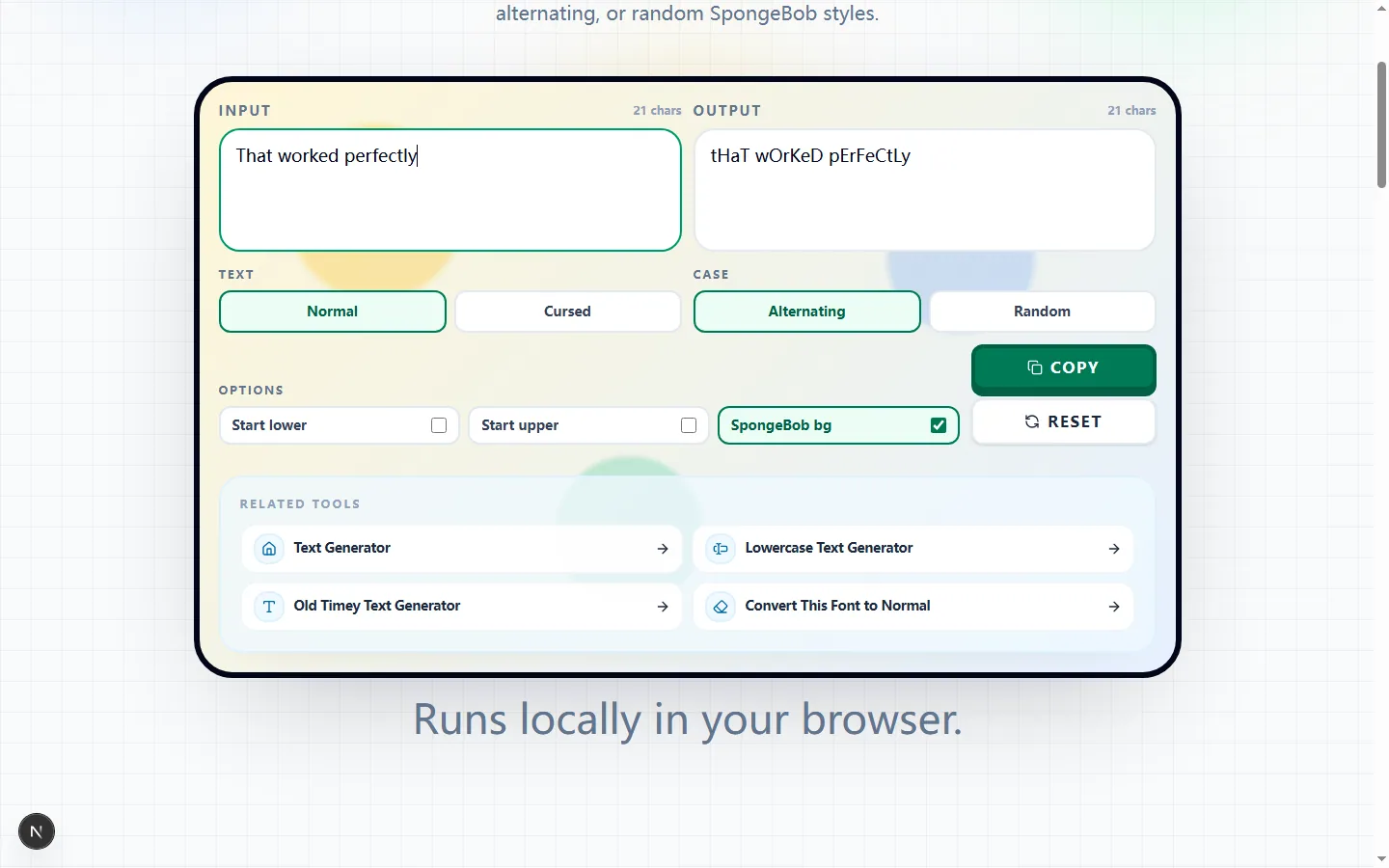
A short sentence makes the alternating capitals easy to inspect and avoids letting decorative options hide the joke's wording.

Test input
That worked perfectly
What was checked
Readable alternating-case mode
Sarcasm Text Generator showing a tested alternating-case version of That worked perfectly
The generated casing changes the tone while leaving the words recognizable enough to copy into a caption or chat reply.Real tool capture; surrounding artwork is decorative.

Turn one line into mocking case without rewriting it

Type or paste the sentence you already want to use. The generator keeps the wording and punctuation, converts letters into the selected upper-and-lowercase pattern, and displays the result beside the input so you can compare both versions before copying.

This is a formatting tool rather than a joke writer or sentiment detector. It will not decide whether a sentence is sarcastic, add a punchline, or change the claim; the tone comes from the words you supply and the familiar mixed-case presentation you choose.

Alternating case and word-start controls

Alternating mode flips the case as it moves through alphabetic characters. Punctuation stays in place, and the default pattern continues across spaces; enable Start lower or Start upper when you want each new word to restart with a consistent first-letter case.

You can choose either Start lower or Start upper, but not both. Try a short sample such as “That worked perfectly” and inspect the start of every word to verify which rhythm reads most clearly for your intended caption or reply.

Random case and Cursed characters are separate choices

Random mode chooses letter case independently instead of following a fixed alternating sequence. Because there is no predictable word-start pattern in that mode, the Start lower and Start upper controls are disabled and cleared when Random is selected.

Normal keeps standard alphabetic characters, while Cursed can substitute some letters with accented characters or symbols from its built-in pools. You can combine Cursed with either casing mode, but the output may vary again after an input or option change because those substitutions are randomized.

The SpongeBob background is only a workspace theme

SpongeBob bg switches the decorative color pattern around the editor. It does not place an image behind the copied letters, alter the output string, or export a meme image; Copy writes only the generated text to the clipboard.

Turn the background off when you want a quieter editing surface or need to compare the letter shapes without extra color. Leave it on when the visual reference helps you judge the familiar mocking-meme tone—the copied result is the same either way.

Good uses and places to avoid

Short reactions, parody captions, playful group-chat replies, and deliberately exaggerated quotes are easy to scan in mixed case. Keeping the source concise makes the capitalization pattern visible and reduces the chance that readers mistake a long block for ordinary prose.

Avoid using the treatment for passwords, email addresses, URLs, code, legal wording, or text that must be copied exactly. Cursed substitutions can change the actual characters, and even normal mixed case may be inappropriate in case-sensitive fields.

Check the copied output in its real destination

Read the output once for meaning before you press Copy, then paste it into the actual comment box, profile field, or chat composer. Confirm that the platform accepts every character, the sentence has not been truncated, and any Cursed glyphs remain recognizable in that platform's font.

If the line is difficult to read, switch Cursed back to Normal or choose Alternating for a predictable pattern. Use Reset to return the options to Normal characters, Alternating case, and the default decorative background before testing a fresh sentence.

Sarcasm text generator FAQ

Got questions about our funny styles? Read up on how this tool handles caching, random letters, and that silly SpongeBob background.

Is this writing the sarcasm for me?

+
No! This tool simply takes whatever you type and alters the capitalization and styling to create that classic Mocking SpongeBob tone. You provide the joke, we provide the format!

What does the Cursed mode actually do?

+
Cursed mode takes your text to the next level by randomly swapping out standard letters with unusual accented characters and symbols. It makes your sarcasm look even rougher and much more exaggerated.

Why can't I click the word-start checkboxes in Random mode?

+
Because random casing doesn't follow any rules! Those checkboxes are disabled when you select Random mode since the capitalization pattern is completely unpredictable.

Does the SpongeBob background change my text?

+
Not at all, it's just for fun! Toggling the background simply gives you that classic meme aesthetic while you use this tool to mock your friends.