Cross Out Text Online

Strikethrough Text Generator

Create perfect crossed-out text in seconds!Read more

How does the Unicode cross-out magic work?

Curious how this tool actually places lines over your words? It uses something called Unicode combining marks. This means the lines attach directly to your text characters, making it super easy to copy and paste anywhere—Chats, bios, or social posts—without turning your words into an image.

Since every app has its own way of rendering fonts, sticking to the classic style in our strikethrough text generator is generally your safest bet. It plays nicely with almost all platforms compared to some of the crazy decorative line variants.

Unicode vs. Markdown: What's the difference?

Here's the deal: this tool adds actual layering marks over each letter you type. Markdown, on the other hand, wraps your words in symbols (like double tildes), hoping that the app you paste into knows how to format it.

This matters because markdown won’t cross out your words everywhere. While we include markdown options for your convenience, our strikethrough text generator really shines by giving you true Unicode lines that travel directly with your text.

Crossed-out text vs. strikethrough text

Crossed-out text and strikethrough text usually mean the same thing: letters with a line running through them. If you searched for a crossed out text generator, the classic strike style is the safest place to start because it creates copy-ready Unicode text instead of an image.

Markdown is a different method. It can work in apps that understand markdown-style wrappers, but Unicode crossed-out text travels with the characters themselves, which is why it is useful for bios, captions, notes, and quick social edits.

When should you use crossed-out text?

People love crossing things out to show price drops, mark tasks as done, add a sarcastic comment, or show a funny before-and-after edit. It adds an immediate visual tone to whatever you're sharing.

Just a quick tip: keep it brief! This effect is amazing on short sentences or titles, but if you cross out a giant paragraph, it can become really tough for your friends to read.

Tested on the live tool

A cross-platform strike test

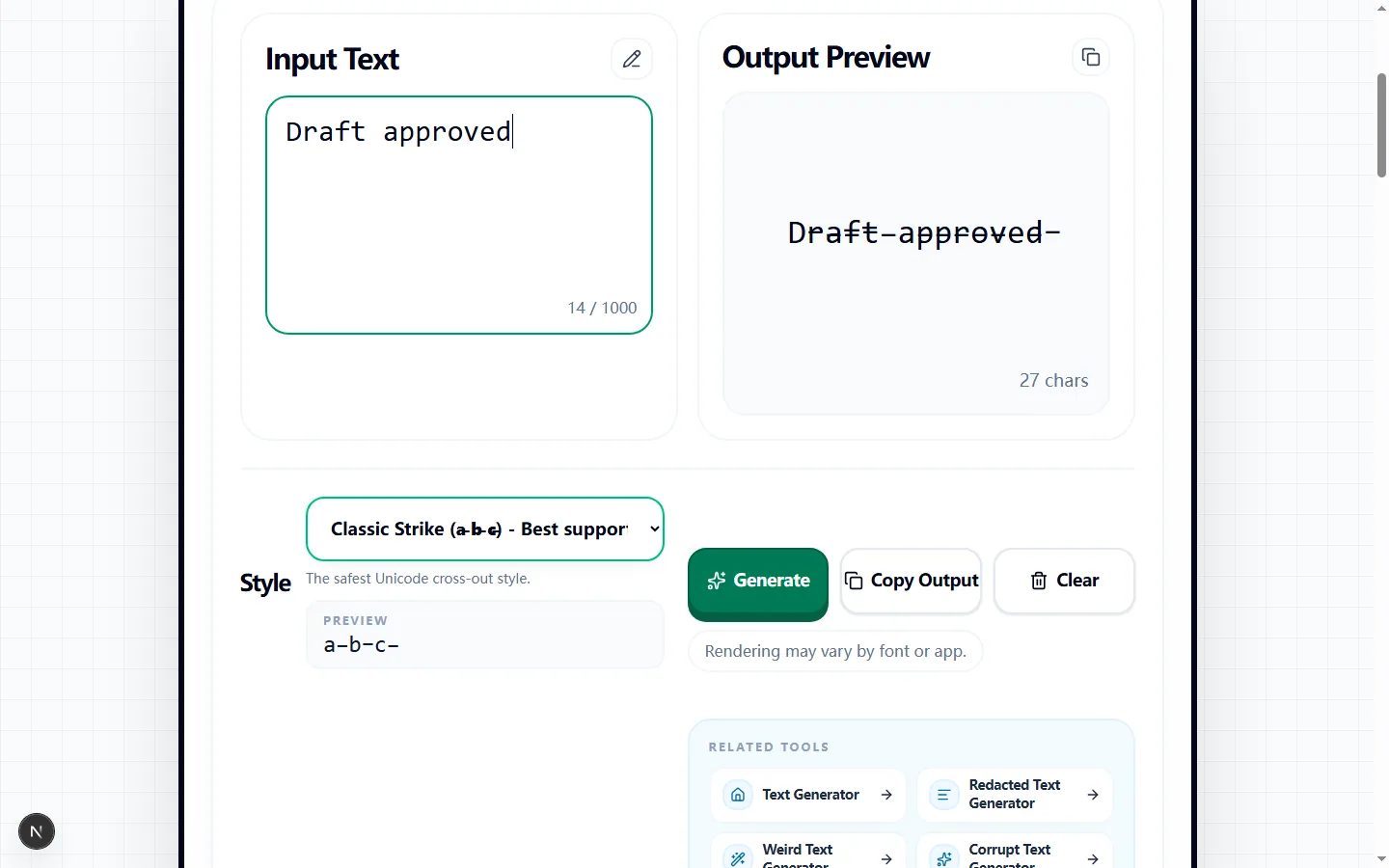
The capture starts with a simple status phrase and compares the generator's copy-ready line treatment with the untouched input.

Test input
Draft approved
What was checked
Classic strikethrough for broad compatibility
Strike Through Text Generator showing a tested crossed-out Draft approved result
The classic combining line crosses the letters without changing their order, providing a practical baseline before trying heavier styles.Real tool capture; surrounding artwork is decorative.

Create crossed-out text from the live preview

Type or paste up to 1,000 characters into Input Text. The Output Preview updates with the currently selected style, so you can compare the transformed line with the original before anything reaches your clipboard.

Start with Classic Strike when you simply need a line through a completed task, old price, or corrected phrase. Keep the effect to a short passage when possible; a full paragraph covered in combining marks is harder to scan and more likely to wrap unpredictably.

How each Unicode line style is produced

Classic Strike, Short Strike, Slash, Long Slash, and Reverse Slash append a different Unicode combining mark after every non-space character. The tool also includes single and double underlines, overlines, a dotted treatment, and a wavy underline built with the same character-by-character method.

These results remain text rather than an image, so Copy Output includes the original characters plus their attached marks. Spaces are left unmodified, but punctuation and letters receive the selected mark; that detail explains why dense punctuation or emoji can produce uneven-looking lines.

When to choose Markdown instead

The Markdown option does not add a Unicode mark to every character. It wraps the entire input in two tildes on each side, producing a value such as `~~draft approved~~` for apps that parse that syntax as strikethrough.

Use Markdown only when the destination explicitly supports it. In a plain text field, unsupported social profile, or app with different formatting rules, the tildes may remain visible; Unicode Classic Strike is the better test candidate when you need the crossed-out appearance to travel with the copied characters.

Compatibility varies by font, app, and character

Classic Strike is labeled Best support in the style menu, while Reverse Slash is marked Experimental. Even the better-supported combining marks can sit higher, lower, or farther across a letter when the destination uses a different font or text-rendering engine.

Some apps normalize text, remove combining characters, or display them awkwardly beside emoji and non-Latin scripts. The generator cannot force another platform to use the same font, and it does not convert the line into CSS formatting, so the output must be checked where readers will actually see it.

Use crossed-out text without losing meaning

Strikethrough is useful for a visibly completed checklist item, a replaced price, an edited joke, or a before-and-after phrase. Pair it with an unmarked replacement or a short label so readers can tell whether the old wording is cancelled, historical, or intentionally sarcastic.

Screen readers and search tools may still encounter the underlying letters, and a listener may not hear the visual line at all. Do not use the effect as a security measure or as the only way to communicate deletion, availability, discounts, or other information that affects a decision.

Check the copied result before publishing

Copy the output and paste it into a draft on the target platform. Compare spaces, line breaks, punctuation, accented letters, and emoji with the source, then view the draft on both a narrow mobile screen and the desktop or web client your audience commonly uses.

If marks collide, disappear, or make the sentence difficult to read, return to Classic Strike, shorten the affected phrase, or use the destination's native formatting controls. For Markdown, publish only after the draft view confirms that the surrounding tildes are parsed rather than shown literally.

Strike through text generator FAQ

Wondering how well this will work on your favorite app? Here are some quick answers to the most common questions we get!

Will the crossed-out text show up correctly on Instagram, TikTok, or Discord?

+
Most of the time, yes! However, it really depends on the app. If you use the classic option in our strikethrough text generator, it’s heavily supported everywhere. Some of the fancier lines might get a bit messy, so keep that in mind.

Why not just use regular markdown formatting?

+
Markdown is great if the platform natively supports it. But our tool produces Unicode text, which means the line is fused to the letters themselves—no special app support required to show the strike.

Is crossed-out text the same as strikethrough text?

+
For copy and paste tools, yes. Crossed-out text and strikethrough text both describe text with a line through the characters. This page uses Unicode line marks so the crossed-out look stays attached when you copy the result.

Is crossed-out text a special font?

+
No. The result is not a downloaded font. It uses Unicode combining marks placed over your regular letters, so some apps may render the line slightly differently from others.

Why are some styles looking a little different from others?

+
Every style uses a unique overlay mark. Some draw slashes, some draw clean lines, and others get super decorative. This variety gives you options, but they all render slightly differently depending on the device you're using.